
🤖
AI Agent First
6 data Skills (parse/validate/filter/query/severity/affected) plus a setup guide Skill, all auto-triggering on vulnerability tasks. No custom integration — clone the repo and the skills are live.
Explore skills
Paste one prompt into Claude Code or Codex — the agent installs itself and starts parsing, validating & querying OSV vulnerability data. Go SDK + CLI + 7 Skills, one Go core.
| 7 Claude Code Skills | 6 data skills + 1 setup guide, auto-triggering |
| 5 CLI subcommands | parse · validate · filter · query · version |
| 7 pre-built binaries | Linux (amd64/arm64/arm) · macOS (amd64/arm64) · Windows (amd64/arm64) |
| 19 ecosystems | npm · PyPI · Maven · NuGet · RubyGems · Go · Cargo · Hex · Pub · Packagist · … |
| 1 Go core | Same typed OsvSchema kernel under all three access layers |
# Pre-built binary (Linux amd64 example — swap version/platform for yours)
curl -fsSL https://github.com/scagogogo/osv-schema-skills/releases/download/v0.1.0/osv_v0.1.0_linux_amd64.tar.gz | tar -xz osv && sudo mv osv /usr/local/bin/ && osv version# Or via Go (1.18+)
go install github.com/scagogogo/osv-schema-skills/cmd/osv@latestPrefer the AI Agent route? Copy one prompt into Claude Code or Codex — the agent installs itself. ↓
The fastest path: copy this prompt, paste it into Claude Code or Codex, hit Enter. The agent installs the CLI, discovers the skills, and is ready to work with OSV vulnerability data. Full version on the AI Agent Integration page.
You now have access to the OSV Schema Skills toolkit
(https://github.com/scagogogo/osv-schema-skills), an AI-native Go library + CLI + Claude Code
Skills bundle for the OSV vulnerability schema. Set it up now:
1. Install the `osv` CLI — download a pre-built binary from the GitHub Release matching my
   OS/arch, or `go install github.com/scagogogo/osv-schema-skills/cmd/osv@latest`. Verify `osv version`.
2. Commands: `osv parse [-v] <file>`, `osv validate <file>…`, `osv filter -e/-r/-a <file>`,
   `osv query --severity cvss3|cvss2 --maven --ranges --events <file>`. Use `-o json` for parsing.
3. Clone the repo to activate the 7 Claude Code Skills (osv-parse/validate/filter/query/severity/affected/installation).
When I ask about a vulnerability, pick the right command automatically, filter by ecosystem if I
name one, extract CVSS + affected ranges, and report concisely. Don't ask me which command to run.
→ Get the full copy-paste prompt →
Working with vulnerability data is painful for both humans and AI:
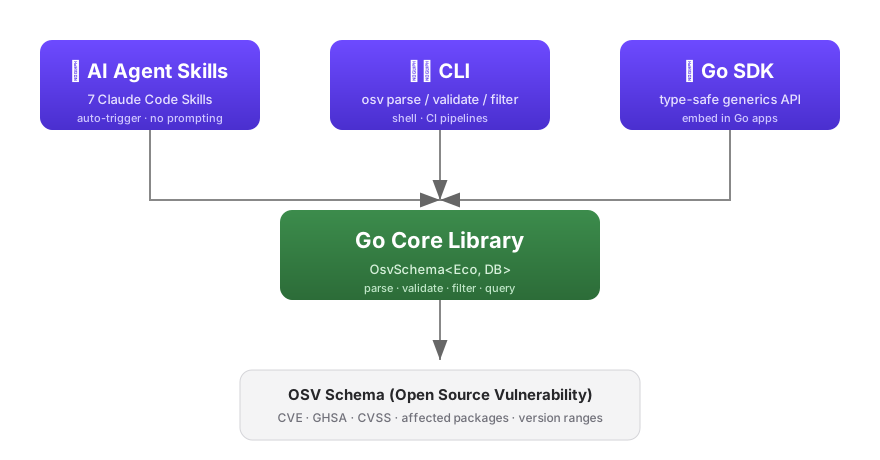
id, malformed ranges, wrong severity types).cat the JSON and hallucinate its way through it.One Go core, three access layers, so the same parsing/filtering/querying logic is reachable from anywhere:
| Layer | Best for | Example |
|---|---|---|
| 🤖 Skills | Claude Code, AI workflows | Agent auto-triggers osv-parse when you mention a vuln file |
| 🖥️ CLI | Shell, CI pipelines | osv filter -e PyPI -o json vuln.json |
| 📦 SDK | Go applications | v.Affected.FilterByEcosystem(osv.EcosystemPyPI) |
The trick is intent-to-skill routing: each SKILL.md declares when it triggers (its description) and what tool it may call (allowed-tools: Bash(osv:*)). The agent matches your request against those descriptions and picks the right osv subcommand — you never have to name it.
Under the hood, every command calls the same typed Go core (OsvSchema[EcosystemSpecific, DatabaseSpecific any]) — so the CLI, the SDK, and the skills can never disagree. The skills are thin declarative contracts; all real logic lives in one place.
Ready to wire up your agent? Copy the prompt →